HINH

HINH
HINH

Thứ Ba, 16 tháng 4, 2013

HQ nhung may lien quan den HQ

AllshareService.apk
AnalogClockSimple.apk có thể được xóa
AnycallServiceCenter.apk Anycall trung tâm dịch vụ có thể bị xóa font chữ
AppleMint.apk của Apple có thể xóa
BCService.apk
Bluesea.apk
ChocoEUKor.apk English
DirectShareManager.apk trực tiếp chia sẻ quản lý có thể xóa
DMMonitor.apk Super Monitor
DSMForwarding cửa hàng ủy quyền apk
DSMLawmo.apk ủy quyền cửa hàng
DualClockDigital.apk và xóa
Daily_Daemon.apk
FmmDM.apk điều khiển từ xa được sử dụng để tra cứu điện thoại hình, có được trở lại tôi có thể nhìn thấy ít
FmmDS.apk điều khiển từ xa được sử dụng để tìm thấy sự lựa chọn của riêng của điện thoại, có được trở lại tôi có thể nhìn thấy ít
GoogleSearchWidget.apk
HelpHub.apk
kieswifi.apk
LTESetting.apk
LTETest.apk
MobilePrint.apk điện thoại di động in ấn
OceanWeather.apk thời tiết biển
OneTouchReport.apk
PageBuddyNotiSvc.apk
PCWClientS.apk điều khiển từ xa
PickUpTutorial.apk
PlusOne.apk
PopupBrowser.apk
RDiagno.apk
ReadersHub_UPG.apk
SamsungTTS.apk
SamsungWidget_FavoriteApp.apk
SamsungWidget_ProgramMonitor apk
sCloudBackupApp.apk
sCloudBackupProvider.apk
sCloudDataRelay.apk
sCloudDataSync.apk
sCloudSyncBrowser.apk
sCloudSyncCalendar.apk
sCloudSyncContacts.apk
sCloudSyncSNote.apk
SecEmail.apk
SecExchange.apk
SecMiniDiary.apk
WeatherNews_Widget_WXGA.apk ACCU Thời tiết Tin tức cắm
WeatherNews_WXGA.apk ACCU Tin tức thời tiết plugin
WeatherWall.apk thời tiết phông nền
WebManual.apk Web Manual
YonhapNews_Daemon.apk Yonhap News
YonhapNews_Widget.apk Yonhap News Plugin

Thứ Ba, 12 tháng 3, 2013

bản giá sửa iphone

1. Iphone 3G :
Loa , chu
ông , mic : 100k -200k
không nhận cáp usb : 150k
Không sạc được , sạc hoài ko đầy :150k

Tr
ắng hàng hình (main) : 150k

No all (no ime, no bltu,no wifi): giá 250k nếu main zin (đã qua sửa chữa báo giá sau )
Lỗi 28 : 250k (đã sửa chữa rồi thì kiểm tra báo sau )
Lỗi 1601 , 1602 : giá 350k main chưa sửa chữa (main qua sửa chửa kiểm tra báo giá sau )
Lỗi mất sóng 3g or 2g hoặc cả 2 : main zin giá 250k (sửa rồi kiểm tra báo giá trong vòng sau )


2. Iphone 3Gs :
Loa , Chuông , mic : 100k -300k
không nhận usb : 250k
Không sạc được , sạc hoài ko đầy :200k ( bị ic nguồn 800k )
Mất đèn MH : 150k
Trắng hàng hình (main) : 200k
Wifi ko hiển thì hoặc tìm mạng ko được : 300k ( đã sửa chữa qua kiểm tra báo giá sau)
Noall : nếu main zin chưa qua sửa chữa 300k (đã sửa rồi sẽ kiễm tra báo giá sau )
Lỗi 21 .1601 , 1602 ....: 400k
Lỗi số 9,14,28,40 : 500k
Thay ic audio : 150k bao đục đóng(nếu có sửa rồi kiểm tra báo giá trong 30p)
Mất sóng 3g or 2g hoặc mất cả 2 : main zin 300k (làm rồi báo giá trong vòng 1 tiếng )


3. Iphone 4 :
Sửa iPhone 4 đang xài tự động mất nguồn : (kiểm tra báo giá tại chổ)
- Sửa iPhone 4 không nhận cáp : kiểm tra báo giá tại chổ)
- Sửa iPhone 4 không sạc được giá: 300k -600k

- Sửa iPhone 4 no IMEI,no Wifi,no Bluetooth giál :1200 ( Gấn Sim là có sóng liên )

- Sửa iPhone 4 mất cảm ứng xoay giá: 400k
- Sửa iPhone 4 mất cảm ứng vài điểm giá:500k
- Sửa iPhone 4 liệt cảm ứng (bị trên bo) giá: 800k
- Sửa iPhone 4 mất đèn màn hình (bị trên bo) giá: 500k
- Sửa iPhone 4 mất sóng giá: 700k
- Sửa iPhone 4 no wifi giá: 700k
- Sửa iPhone 4 hư IC nguồn giá: 800k
- Sửa iPhone 4 cắm tai nghe không nghe (bị trên bo) giá: 300k
- Sửa iPhone 4 Mic nói không nghe (bị trên bo) giá: 300k
- Sửa iPhone 4 mất loa(bị trên bo) giá: 300k
- Sửa iPhone 4 khi gọi bị mất Mic và Loa giá: 300k

4 .Iphone 4s :

Mất sóng : 700k
No WiFi : 900k
Mất cảm ứng : 600k
Mất đèn flash : 500k
Mất nguồn ( IC nguồn ) : 900k
mất âm thanh nghe gọi : 700k
Mất chuông : 700k

Tai nghe ko nghe, rè : 700k
No all, : 1.200k
5. Iphone 5
- Mất Nguồn 3T5
- Mất sóng 2T5
-Sac ko vô Pin : 1T2
-Lổi 37 : 2T8
-Ban Bệnh khác vui lòng Call

Thứ Tư, 6 tháng 3, 2013

pass ip Gecko_iPhone_Toolkit

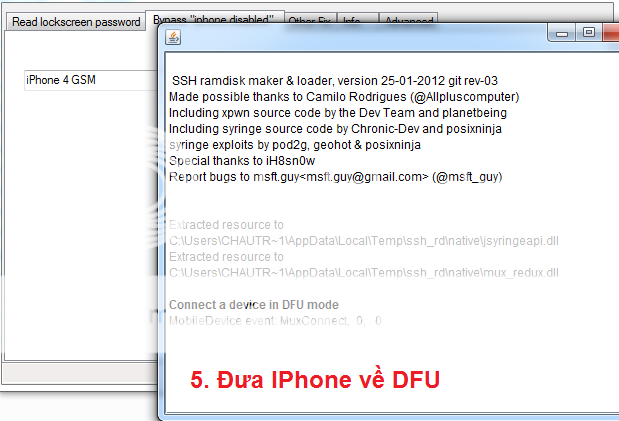
I: Đọc mã Passcode:


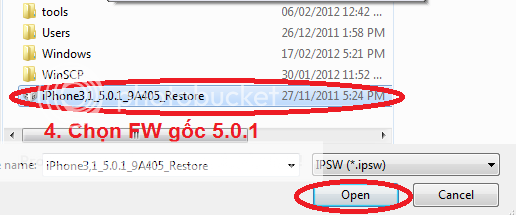
(Ở bước 4 phải chọn đúng FW gốc máy đang chạy.Ở đây máy mình đang chạy fw 5.0.1 nên mình chọn Fw gốc 5.0.1)


II: iPhone bị Disable (do bấm Pass sai nhiều lần):


Thứ Ba, 8 tháng 1, 2013

HTC G1

A master reset restores the original factory settings and will erase all downloaded content, including ringtones, contacts stored in the handset memory, etc. It does not erase data stored on the SIM card or memory card (if available). Back up all necessary data on the device memory before proceeding.
Menu Path Method:

  1. From the Home screen, press the Menu Button and select Settings.
  2. Select SD & phone storage.
  3. Select Factory data reset.
  4. Select Reset phone.
  5. Select Erase everything.
  6. The device will dump all of the data and reload.
Key Stroke Method

  1. If the device is turned on, turn it off.
    • Note: If the device is not responsive and does not turn off, remove the battery and re-insert it.
  2. Press and hold the Home + Power key.
  3. Keep holding for at least 25 seconds, even if  the 'Startup' screen appears.
  4. Release the keys when you see a black screen with a warning sign.
  5. Slide the keyboard open.
    • NOTE: As a shortcut, press ALT + W to factory reset the device. If this does not work continue with the below steps.
  6. Press ALT+L.
  7. Press ALT+W for 'wipe data/factory reset'.
  8. You should then remove the battery and re-insert it. Then turn the device back on and allow it to startup.
    • NOTE: might take a few minutes longer than usual to bootup after performing this full reset


     http://community.htc.com

Thứ Hai, 7 tháng 1, 2013

DT

Cách làm một robot dò đường đơn giản.

Hướng dẫn cách làm một robot dò đường đơn giản (đúng hơn là một chiếc xe lần mò theo vạch đen)

* Chuẩn bị:
- Linh kiện:
- 1 con Opamp loại 8 chân LM393 (2 kênh) hoặc loại 14 chân (4 kênh) LM324. Nếu không có loại LM có thể xài loại khác, như HA chẳng hạn.
- 2 con BJT loại NPN C1815 (hoặc loại khác cũng được).
- 2 quang trở.
- 2 led siu sáng (trắng).
- 6 điện trở 10k.
- 2 Mô tơ, loại cỡ 5V, có thể lấy từ xe đồ chơi của con nít (ở đây tớ lấy từ ổ CD-Rom 1 cái và chôm của thằng bạn 1 cái).
- Nguồn sử dụng 9V hoặc 4.5V (ở đây mình xài nguồn 9V).
- 2 điện trở hạn dòng cho led phát 1k (nếu xài nguồn 9V) và khoảng 220 ôm nếu xài nguồn 4.5V).

- Và các đồ phụ gia tráng trí khác, chủ yếu là led gắn vào cho đẹp, một vài cái dắt cắm, công tắc...
- Đồ dùng khác: mỏ hàn, chì hàn, kéo, băng keo đen (làm vạch)…

* Bắt đầu làm:
+ Phần mạch (ta tách riêng thành 2 phần, 1 phần cảm biến và 1 phần mạch chính cho dễ lắp đặt):
1. Bộ phận “cảm biến”:
-Cách làm:
Sử dụng 2 quang trở, 2 led phát, 2 trở hạn dòng cho led phát. Mắc theo sơ đồ sau:


Ảnh thực tế:


Đặt 2 quang trở cách nhau khoảng 3.5cm-4cm, dùng băng keo đen quấn quanh quang trở để chống nhiễu. Ở đây mình sử dụng thêm 2 công tắc cho led phát để tắc ”khi cần thiết”.

-Nguyên lý hoạt động:
Khi có ánh sáng thì điện trở của quang trở sẽ giảm và ngược lại, điện trở của nó thay đổi cỡ từ 5k (khi có ánh sáng) đến 100k (không có ánh sáng), ta sử dụng 2 led phát làm nguồn sáng cho nó.
=> khi gặp nền trắng, ánh sáng sẽ phản xạ lên quang trở làm điện trở nó giảm xuống và khi gặp vạch đen (băng keo đen) thì ánh sáng sẽ khó phản xạ nên quang trở nhận ít ánh sáng => trở nó tăng. Từ đó dựa vào 2 quang trở, robot có thể phân biệt được vạch đen trên nền trắng (dưới sự hỗ trợ của opamp so sánh).


2. Mạch điều khiển moto (mạch chính)

Sử dụng 6 con trở 10k, Opamp, nguồn 9V, 2 con BJT.

Bjt C1815:


Nguyên lý hoạt động của BJT: miễn bàn.

Opamp LM 324:


Nguyên lý so sánh đơn giản của opamp thế này:
Nếu cho vào cổng (+) (cổng 3, 5, 10, 12) một điện áp lớn hơn điện áp cổng (-) (cổng 2, 6, 9, 13) thì ở cổng ra (cổng 1, 7, 8, 14) sẽ là mức dương, ngược lại là mức 0. Nhớ cấp nguồn cho Opamp ở 2 cổng 4 và 11.

Ở đây mình chỉ sử dụng 2 kênh là (1,2,3) và (5,6,7).

Sơ đồ:


Ảnh thực tế (nhìn hơi rối mắt ) :


Và đây là mạch hoàn chỉnh (2 mạch trên ”cắm” lại với nhau thôi).


+ Phần cơ (phần này hơi khổ).
Chuẩn bị 2 moto và thêm 2 bộ phận giảm tốc, bộ phận này giúp robot dễ ”cày” hơn nhưng chạy chậm hơn. Chạy chậm giúp robot dễ nhận vạch hơn vì mấy cảm biến này thay đổi hơi chậm (chậm mà chéc [dancing] ).
2 moto ta sẽ gắn với 2 bánh sau, phía trước gắn 1 bánh xe có thể đổi hướng (giống bánh xe ở cái ghế của mấy cha giám đốc á, tất nhiên là xài loại nhỏ thôi). Nếu ko tìm ra loại bánh xe đó thì... đành phải tự chế thôi.

Bên dưới... xe

Bên trên (nói chung là nó cứ như miếng nhựa với 2 bánh xe, chụp ảnh từ di động cùi nên ảnh ko đẹp cho lắm )


+ Phần ”sân” (cái này tốn keo lắm).
Lấy khoảng 4-6 tờ A4 ghép lại thành sân, lấy keo đen dán lên làm vạch, nhớ dán cẩn thận, tránh gồ gề (chỗ uốn dễ bị ”lồi” keo) để xe có thể dễ bon bon trên vạch.
Đây đã tốn nửa cuộn keo đen (5k 1 cuộn) để dán đi dán lại cái sân mà chẳng ra hồn.

Thứ Sáu, 21 tháng 12, 2012

sony

w580i cid53
dùng bảng setool v1.01 > chọn moden > setting chọn 1 > thoát ra lại sonyericson > nhấn recovery > tiếp tục chọn empty fill & repair > chọn đường tới gdfs_in_ssw_format > chọn db2020 chọn file W580_GDFS_SSW.ssw nhấn flash khi flash xong tiếp tục xóa file gdfs đó đi > chọn đường dẫn đến eroms chọn db2020 chọn file erom DB2020EROM_CNV_RED52_BROWN_CID49_DB2020.ssw nhấn flash > chờ đến khi flash hoàn thành thì trở lại thanh sonyericson > setting chọn 1,4 > chọn file rồi full flash lại

unlock iphone


Vì lí do có nhiều bạn không biết cách Active máy lên World sau khi đã mua code nên mình viết bài hướng dẫn này mong giúp được các bạn ít nhiều.

Đối với iPhone thì sau khi mua code unlock bạn sẽ không nhận lại một đoạn mã code gồm nhiều ký tự để nhập vào máy giống như mua code unlock Nokia hay một số dòng máy khác, nhưng cái mà bạn sẽ nhận là Status (tình trạng) của máy là UNLOCKED, trước khi mua code thì Status sẽ làLOCKED, vậy làm sao có thể biết đươc Status iPhone của mình là Lock hay Unlock ? Muốn biết được điều đó các bạn hãy vào đường Link sau:http://www.s-url.ro or http://iphoneimei.info
Nhập 15 số IMEI của iPhone vào khung Enter IMEI và Check.
Lưu Ý: Đối với IPHONE 5 không check được như hướng dẫn trên.
Máy chưa mua Code:
[IMG]
Máy đã mua Code:
[IMG]
Sau đây là cách Active máy: (Nếu máy đang xài sim ghép thì lấy ra nhé)
Cách 1 : Đối với máy chưa Jailbreak (chưa cài Cydia): Bỏ sim Việt Nam vào, cắm cáp vào máy vi tính, vào kết nối với iTunes để Active lên World, trên iTunes sẽ hiển thị như sau:
[IMG]

Cách 2 : Đối với máy đã Jailbreak (đã cài Cydia):
Sẽ có 2 cách làm trong trường hợp này: (Luôn luôn lưu ý là nên Backup dữ liệu trước khi tiến hành)
Ta có thể dùng Redsnow để Deactivate máy, đưa máy trở ra màn hình Active để tiến hành Activate lên Wolrd.
Cách làm như sau: (Trong VD này là iPhone 4 đang chạy iOS 5.1.1)
- Mở Redsnow 0.9.15b3 download tại đây
Tắt iPhone của bạn cắm vào máy tính mở Redsnow lên và bấm Next
[IMG]
Redsn0w sẽ hướng dẫn bạn đưa iPhone về chế độ DFU

Giử phím nguồn khoảng 3 giây
[IMG]
Giữ phím Home + Power (Nguồn) khoảng 10 giây

[IMG]
Nhả phím Power (Nguồn) và giữ nguyên phím Home cho tới khi Redsn0w nhận ra được iPhone

[IMG]
Bỏ chọn Cydia và chọn Deactivate => bấm Next
[IMG]
Tiếp sau đó iPhone sẽ tự chạy và đưa máy trở về màn hình Active, khi đã vào màn hình Active ta tháo cáp ra gắn sim VN vào kết nối máy với iTunes để tiến hành Activate lên World. Chúc các bạn thành công!!!
Cách 3 : cài Sam để active

B1: Mở Cydia : Manage > Sources> Edit > add source repo : http://repo.bingner.com
Sau đó vào search cài đặt SAM và SAMpref
B2: Click "Revert Lockdownd to Stock" trong Settings>SAM (cái này giúp bỏ kích hoạt h@ckative trước đây của Custom FW)
B3: Vào Settings > SAM and ấn vào "De-Activate iPhone"
B4: Kết nối với iTunes để kích hoạt
B5: Vào to Settings » SAM » Utilities » chọn Backup Activation sau đó chọn nhãn Restore Activation
B6: Khởi động lại iPhone và sync với iTunes

Cách 4 : Cách cuối cùng là Restore lại máy
Khuyên các bạn nên Deactivate máy mà không nên Restore vì hiện tại iOS 6.0 chưa thể Jailbreak Untethered và cũng chưa có appsyn 6.0 để đồng bộ ứng dụng, quan trọng hơn cả là Deactivate sẽ không làm mất dữ liệu và các ứng dụng mà bạn đã cài vào máy, nên giữ máy ở iOS 5.1.1 vì sẽ rất tiện cho ai không có nhiều money để mua App Licence [IMG], ít nhất là trong thời điểm hiện tại
 nguon(tinhte.vn)
check_imei lock hay world


xem đúng nhà mạng AT&T?

Thứ Năm, 20 tháng 12, 2012

Mở Mã Bảo Vệ LG

Tất cả LG bị mã bảo vệ, chúng ta không gắn SIM sau đó bấm 26911147#*250# Sẽ ra được menu test, sau đó xuống mục Factory Setting ! => OK

Với các dòng máy cũ thì 2945#*# sẽ ra Menu Test

đã test trên KS300 bấm 2945#*# ra menu bấm vào mục thứ 6  (Fac)  chờ 1' để tự khởi động lại là ok

 Factory code   3845#*đời máy#

                          1809#*đời máy#

vidu  GW525   bấm 3845#*525#

           GD880           3845#*880# 

          GT505          *3845*#505#

  GT540     pow on > vol up +home +search


 Flash dòng Infinion:

Setup GSMulti V30
Cắm cáp vào. Chọn driver theo đường dẫn: C:\GSMULTI\UsbDrivers\INFINEON
Mở USBMap ở mục C:\GSMULTI rồi chọn dòng Infinion rồi MAPPING START , rút cáp ra rồi cắm lại, khi đó PC sẽ nhận máy rồi bấm SAVE & EXIT
Mở GSMulti--->Chọn Setting(s) ---> Configuration. Chọn file *.dll + file flash. Chọn tiếp USB rồi bấm OK. Bấm START, ở mục USB sẽ xuất hiện dòng chữ Wait Phone Connecting. Rút cáp ra cắm lại là ok.

Flash dòng ADI:

Cài GSMulti V30
Cài driver USB : LGUSBModemDriver_WHQL_ML_Ver_4.9.7_All_Win7_MTK
Cài MTK_Download_Setting.
Cắm USB vào máy không cần pin => cài driver ok
Mở USBMAP chọn MTK >> MAPPINGSART >> Save. Rút USB ra.
Mở GSMulti V30. Vào mục Setting(s) >> Configuration chọn file DLL + file flash, chọn USB xong rồi bấm OK.Bấm START, ở mục USB sẽ xuất hiện dòng chữ Wait Phone Connecting. Rút USB ra rồi cắm lại > Please wait > Done
Flash dòng TI:

Cài GSMulti V30
Cài driver LGE_GSM_Device_Driver_OMAPV1030_1.0 ở trong bộ setup driver: LGUnitedModemDriver_WHQL_ML_Ver_4.9.7_All_Win7_LGE All
máy tính nhận USB ok.
Mở USBMAP chọn TI >> MAPPINGSART >> Save. Rút USB ra.
Mở GSMulti V30. Vào mục Setting(s) >> Configuration chọn file DLL + file flash, chọn USB xong rồi bấm OK.Bấm START, ở mục USB sẽ xuất hiện dòng chữ Wait Phone Connecting. Rút USB ra rồi cắm lại > Please wait > Done all
Flash dòng Qualcomm:

Cài USB driver trong bộ setup driver nay: LGUnitedModemDriver_WHQL_ML_Ver_4.9.7_All_Win7_LGE All
Mở LGDP trong bộ setup: LGMDP_1.5_build_12.14.Bấm Select Port sẽ hiện ra 1 bảng Select Port thấy đời máy và firmware >>> Bấm Connect.
Trong ô Image Folder bấm Browse để chọn file image.
Bấm DZ >> chọn file DZ.
Bấm Start đợi vài phút lụm hàng
Flash dòng Semc(A2):

 ngồi buồn làm cái hướng dẫn chia sẻ cùng anh em về LG GT505 khi gặp máy khởi động lại hay đơ đơ ,quá chình cài đặt chạy hơi phức tạp chút lên em hướng dẫn qua anh em nào biết thì bổ xung thêm nhé


tools and file + video hướng dẫn up Firmware LG GT505

pass: ĐiệpNhànMobile

1 : tải tools and file + video hướng dẫn up Firmware LG GT505
2: Giải nén tất cả những thư mục mà em đã up lên như bình thường
3: mở thư mục GT505_Upgrade_Tool có hai thư mục 1 là First LGDP2_Setup[1] ..2 là LGDP2_V35_UMTS ...bạn vào First LGDP2_Setup[1] và lích vào LGDP2_31_INCLUDE_LGDP1_Setup điền số serial đi kèm vào để hoàn tất quá trình cài đặt
4:Tiếp đến , bạn mở tiếp LGDP2_V35_UMTS vào copy LGDP2_V35_UMTS vào "C: \ Download".( thư mục vừa được set up ở trên
5 : Quay trở lại LGDP2_V35_UMTS vào EMP_DL_USBDriver Nhấp đúp chuột vào 'installme' để setup driver cho nó =>>xong
6:cài tiếp GM730_LGSPUSBDriver_Eng_Ver_2.0
7.: tháo bin lại lắp vào ,nhớ bin đầy nhé, bấm và giữ nút âm lương + '' Và kết nối vào cáp USB. bấm giữ khoảng 10 giây.có khi 30 giây để kết nối điện thoại với máy tính
8:Tiếp theo vào 'C \ Download' tìm đến thư mục 'LGDP2_V35_UMTS' và mở nó lên
9:Trong phần Division Selection " chọn' UMTS ' và nhấn OK !cho đến khi hiên tiếp bảng Port selection.
còn mọi cái khác thì đã có video hướng dẫn chi tiếp.chúc vui 


LGUnitedModemDriver_WHQL_ML_Ver_4.9.7_All_Win7_LGE All
MTK_Download_Setting
SETUP_GSMULTI_V30
LGMDP_1.5_build_12.14_Sep_16_2008


  Infineon: GB100, GB100a, GB101, GB102, GB102GO, GB105, GB105a, GB106, GB107, GB108, GB109, GB110, GB115, GB125, GB125a, GB125b, GB125R, GB130, GB210, GB220, GB220GO, GB220N, GB220NGO, GB230, GB250, GB250f, GB250g, GB255, GB255f, GB255g, GB258, GB280, GC900, GC900e, GC900f, GD310, GD350, GD510, GD510GO, GD510N, GD550, GD550e, GD900, GD900e, GD900f, GD910, GD910c, GD970, GM310, GM310f, GM310g, GS100, GS101, GS101a, GS101GO, GS102, GS105, GS106, GS107, GS107a, GS108, GS117, GS155, GS155a, GS155b, GS290, GS290GO, GS290N, GS290NGO, GS390, GS390GO, GS500, GS500g, GS500v, GT350, GT350GO, GT350i, GT360, GT365, GW520, GW525, GW525f, GW525g, KC550, KC550d, KC560, KC780, KE260, KE600, KE608, KE770, KE800, KE820, KE850, KE850a, KE858, KE970, KE970GO, KF350, KF350d, KF510, KF510c, KF510d, KF600, KF600c, KF600d, KF900, KG270, KG271, KG275, KG276, KM380, KM380c, KM380d, KM380T, KM385, KM900, KM900e, KM900f, KP100, KP105, KP106a, KP106b, KP107, KP107a, KP108, KP270, KP275, KP500, KP501, KP502, KP550, KP570, KS360, KS365, KS660,

Infineon AGold: GM360, GM360GO, GM360i, GM600, GU220, GU230, GX300, GX500

Qualcomm: BL20, BL20e, BL20GO, BL20T, BL20V, BL40, BL40e, BL40f, BL40g, BL42k, CB630, CT810, CT815, CU405, CU500, CU500V, CU515, CU575, CU720, CU915, CU920, GD570, GD570AQ, GD880, GD880f, GD880g, GM630, GM730, GM730e, GM735, GM750, GM750h, GM750n, GM750Q, GR700, GS505, GT540, GT540f, GT540g, GT540GO, GT540R, GT950, GU280, GU280f, GU285, GU285f, GU285g, GU290, GU290v, GU292, GU295, GU295g, GW620, GW620f, GW620g, GW620R, GW820, GW825, GW825v, HB620, HB620T, KB620, KB770, KB775f, KC910, KC910e, KC910i, KC910Q, KC910Qa, KE990, KE990c, KE990d, KE998, KF310, KF311, KF390, KF390Q, KF690, KF700, KF701, KT610, KT615, KU250, KU310, KU311, KU380, KU385, KU450, KU800, KU950, KU970, KU990, KU990GO, KU990i, KU990R, TU500, TU515, TU720, U250, U300, U300c, U310, U310c, U370, U450, U830, U880, U890, U900,U960, U990.

ADI: GM200, GM205, GM210, GW300, GW300FD, GW300GO, GW305, GW880, KF240, KF20c, KF240d, KF240T, KF245C, KF300, KF300c, KF300e, KG108, KG110, KG118, KG120, KG130, KG130GO, KG210, KG220, KG225, KG240, KG245, KG280, KG290, KG291, KG296, KG320, KG800, KG920, KP110, KP115, KP130, KP135, KP170, KP175, KP200, KP202, KP202i, KP210, KP215, KP230, KP233, KP260, KP265, KP293i,

TI: CG180, CG225, CG300, CP150, GD330, GD335, KE500, KE508, KE590, KM500, KM501, KM710, KM710d

MTK: GB160, GB160a, GB160b, GB161, GB165, GB170, GB175, GB190, GB190a, GB195, GB270, GS190, GS205, GX200, KF301, KG190, KG195, KG200, KG300, KM330, KM335

SEMC(A2) : CF360, GD580, GD710, GR500, GR500f, GR500R, GR501, GT400, GT400GO, GT405, GT500, GT500N, GT505, GT505e, GW370, GW370B, KF750, KF755, KF757, KF758, KS500, KT520, KT525


Thứ Tư, 19 tháng 12, 2012

mã bảo vệ VIETTEL

Đầu tiên các bạn tháo Sim ra mở nguồn rồi bấm lênh:
#7465625*2877#

Bấm tiếp: *2767*3855#
Sau khi máy khởi động lại, tắt nguồn bỏ Sim vào nhập 8 con số 1 ok lúc này máy vẫn bị khóa, cứ để yên như zậy 30 phút rồi nhập tiếp 8 con số 0 là ok.
(Lưu ý: nếu trong quá trình chờ các bạn bấm phím thì phải làm lại từ đầu).

Không cần thiết phải lắp nửa Sim.


Chúc các bạn thành công!

 Chính xac hơn là làm như thế này:
Đã có nhiều người nói về vấn đề này và cũng đã làm con được con ko, riêng mình làm thấy rất ổn ko phải đút nửa sim hay cả sim
Đầu tiên khi đã bị mã bảo vệ ,thì việc đầu tiên ta phá tiếp cho treo luôn=cách cứ bấm mã linh tinh khoảng hơn 10 lần==> phone frezeed ==>ok
Tháo sim ra dùng lệnh #7465625*2877#
Bấm tiếp *2767*3855#
Đút sim vào nhập 8 số 1 ok lúc này máy vẫn lock ko sao để nguyên đó đừng làm gì ,chờ khoảng 30 phút đến 2h nhập tiếp 8 số 1 ok
Lúc này máy báo sublock ta bấm tiếp 8 số 0===>ok
Nếu sai vui lòng làm lại từ đầu.

Thứ Ba, 18 tháng 12, 2012

có thể và không thể

J706 nạp J700dx = OK
J706 to J700 ok
M628-->M620=OK có TV
E908-->E900=OK có TV
T809-->D820=OK có TV
J700v-->J700=OK có TV
Z248-->Z240=OK có TV (lúc nạp tv nếu gặp trường hợp nạp nữa chừng báo error time out thì hãy để máy vào download mode (9+pw) chừng 20 phút và nạp lại là ok )
P858-->P858=OK có TV
D908-->D900=OK có TV
F480v--> F480 có tv
C308 to C300 TV ok tested
J608 to J600 TV ok
D508-D500c to D500 TV ok
X427 -> X426
X495, X497 -> X490
F488 -- > F480 = Ok có TV
E258 to E250 có Tv ok
E258D to E250D có TV ok
U700v -> U700=tv ok
C3050 -> C3053= tv ok
J600v vodafone ---> J600 ok
C3050 <---> C3053 tv ok
C3050C nạp file C3053 cũng ok.
U600G--->U600 ok có tv
J208 >>>J200 tiếng việt ok
T809 nạp D820 có TV OK
J708 nạp J700 TV ok
F258 > F250 tv ok test vài cây rồi
L708->L700DXHH4 oke (có TV đã test)
e250v DBUGK1--->>> tiếng việt e250d ok
C5130s nạp qua C5130 ok có tv.
S5600H nạp S5603 có tiếng việt ok

KHÔNG THỂ:
J700i-->J700
U608B-->U600
j700i_t nạp qua j700i not ok
U900T, U900u nạp TV U900 = not ok

nhập code unlock

Model: LG P500 Optimus
1. Power ON your phone with not allowed sim card (one that didn’t come with the phone)
2. Type 2945#*500#
3. the phone will ask you to input the unlock code twice, just input the unlock code
4. Device is now unlocked

Model : LG GW300 Viewty & Gossip

1. Power on your LG Viewty GW300 with the original SIM card in.
2. Enter 2945#*71001#
3. A menu will pop up, select SIM Unlock.
4. Enter your unlock code and hit OK.
5. Your LG Viewty GW300 may automatically reboot and should now be unlocked!

Model: LG GT350 Town

1. Power on the LG GT350 Town with the original SIM card in.
2. Enter 2945#*350#
3. A menu will pop up, select SIM Unlock, DO NOT select NETWORK unlock.
4. Enter your unlock code and hit OK.
5. The LG GT350 Town will restart..
6. Put in any sim card you want, you will need to make a call for the new sim card to initialise with the phone.
7. Thats it, mobile unlocked.

Model: LG GM360 Viewty Snap

1. Power on your LG Viewty GM360 with the original SIM card in.
2. Enter 2945#*360#
3. A menu will pop up, select SIM Unlock.
4. Enter your unlock code and hit OK.

Model: LG GS290 Cookie Fresh

1. Power phone ON with original SIM
2. Type 2945#*290# to enter unlock menu
3. Enter the unlocking code

Model: LG GT400

1. Turn phone on without simcard
2. Press telephone icon at bottom of screen to bring up the phone keypad
3. Enter 2945#*400#
4. A menu will pop up, select network unlock
5. Enter your unlock code and press ok
6. The phone will then reboot and the unlock is complete

Model: LG GW620

1. power phone ON with original SIM
2. type 2945#*620# to enter unlock menu
3. Enter the unlocking code

Model: LG GM205

1. switch on your phone with original working simcard
2. enter code 2495#71001# .. nothing will show in the screen.
3. now go to menu > setting > security > simlock > network lock > deactivate: enter your unlock code in it

Model: LG GW820 eXpo

1. Power on your LG GW820 eXpo with the original SIM card in.
2. Enter 2945#*700#
3. A menu will pop up, select SIM Unlock.
4. Enter your unlock code and hit OK.
5. Your LG GW820 eXpo may automatically reboot.

Model : LG GM205

1. Power phone ON with original SIM
2. Type 2945#*71001# to enter unlock menu
3. Enter the unlocking code

Model: LG GB250, GB220


1. Power on your phone without SIM card
2. Enter 2945#*71001#
3. From the menu that pops up select "SIM unlock"
4. Enter unlock code you received from UnlockBase and press OK
5. The phone will then reboot and the unlock is complete

Model : LG GW520

1. power phone ON with original SIM
2. type 2945#*71001# to enter unlock menu
3. Enter the unlocking code

Model : LG Viewty / GW300

1. Power on your LG Viewty GW300 with the original SIM card in.
2. Enter 2945#*700#
3. A menu will pop up, select SIM Unlock.
4. Enter your unlock code and hit OK. (Entering multiple incorrect unlock codes may permanently lock your phone!)
5. Your LG Viewty GW300 may automatically reboot and should now be unlocked!

Model: LG BL20

1. insert original sim card and turn phone on.
2. Enter 2945#*20#
3. A menu will pop up, select sim unlock
4. Enter your unlock code and press ok

Model: LG BL40

1. insert original sim card and turn phone on.
2. Enter 2945#*40#
3. A menu will pop up, select sim unlock
4. Enter your unlock code and press ok

Model : LG C1100

- First you must put in an allowed simcard, then :
- type 2945#*1201#.
- Goto Menu/Settings/Security Settings/Sim Locks
- Select 'Locktype'/Deactivate and Enter the code.

Model : LG GT505

- power phone ON without SIM
- type 2945#*505# to enter unlock menu
- enter unlock code

Model : LG GB250

- power phone ON without SIM
- type 2945#*71001# to enter unlock menu
- enter unlock code

Model : LG GW520

- power phone ON without SIM
- type 2945#*71001# to enter unlock menu
- enter unlock code !

Model : LG KB770

1. Power on phone with original SIM card
2. Type 2945*#770#
3. In the menu that appears select Sim unlock
4. Enter supplied unlock code
5. Your phone is unlocked

Model : LG KP170

1 - Switch ON your phone with a T Mobile Sim inserted
2 - Press telephone icon at bottom of screen to bring up the phone keypad
3 - Then compose : 2945#*170#
4 - A menu will pop up, select Unlock Usim
5 - Then Select Network Lock
6 - Enter your unlock code and press ok (you only have 10 attempts)
7 - The phone will then reboot and the unlock is complete.

Model: LG CU-515

1.Put a SP-locked sim in the phone, phone say invalid smart chip
2.Now enter *#865625# then select option 1 and then again select 1 and enter your 16 digits code
Phone will be unlocked!

Model : LG TE365

1. Power on phone with original SIM card
2. Type *#0001#code#
3. Your phone is unlocked

Model : LG CT810 (Incite)

1. Power on phone with original SIM card
2. Type 2945#*810#
3. In the menu that appears select Sim unlock
4. Enter supplied unlock code
5. Your phone is unlocked

Model : LG CB630 (Invision)


1) Insert an AT&T or Cingular SIM in the phone; it does not have to be an active SIM
2) Dial this into the LG Incite's phone menu
3) *#865625#
4) Press CALL.
5) It should you ask you for the code.

Model : LG U830

1. Have your unlock code handy.
2. InserI a 3 SIM card in the phone and switch power on.
3. Enter the following key sequence 94471877#*#
4. Select the option ‘unlock USIM’.
5. Select the option ‘network unlock’
6. Enter your unlock code.
7. Handset should now display ‘network unlock success’.
8. Handset will now restart.

Model : LG KF300

1. Put wrong simcard
2. Phone alert 'insert correct card'
3. Right under in screen you see deblokkeren (dutch)
4. Click on it en click 'Network lock off'
5. Insert code!

Model : LG KP100

1. Insert original sim card and turn phone on.
2. Enter 2945#*20001#
3. Sim unlock mode pop up .
4. Enter your unlock code and press ok
5. The phone will then reboot and the unlock is complete.

Model : LG KF755d

1. Insert original sim card and turn phone on
2. Press telephone icon at bottom of screen to bring up the phone keypad
3. Enter 2945#*755# (or 2945#*750# if 1st option doesn't work)
4. A menu will pop up, select sim unlock
5. Enter your unlock code and press ok
6. The phone will then reboot and the unlock is complete

Model : LG Incite CT-810

- Insert a SIM from the original network
- 2945#*810# will show the unlock menu
- Enter unlock code

Model : LG KP265

1 - Use Original SIM to switch ON the Phone.
2 - Compose 2945#*265#
3 - Then go to MENU > SETTINGS > SECURITY
4 - Then go to SIM LOCKS > NETWORK > DESACTIVATE
5 - ENTER NCK (your Unlock Code)

Model : LG ME550

1 - Use Original SIM to switch ON the Phone.
2 - Compose 2945#*71101#.
3 - Menu will appear, go to settings > security > sim lock
4 - Enter NCK ( Unlock Code ) and press OK.

Model : LG TU915

- Switch ON your phone with an allowed SIM Card
- Then compose: 2945#*9701#
- It should you ask you for the code.

OR

Enter *#865625# then enter your 16 digits code.

Model : LG KF390, KF390q and CF360

1) Insert a SIM Card from the network the mobile is locked to and turn it on
2) Insert the following sequence *#865625#;
3) Select 'Unlock USIM'
4) Select 'Network Lock'
5) Insert the unlock code
6) Select ok. Done!

Model : LG G910 :

1. Insert an invalid simcard and turn phone on.
2. Insert PIN
3. Phone says \"Invalid sim card\"
4. Select \"Emergency calls\"
5. Enter 2945#*71001#
6. Sim unlock mode pop up
7. Select netlock
8. Enter your 16-digit unlock code and press ok
9. The phone will then reboot and the unlock is complete.

Model : LG Prada, KE850 :

1. Switch the telephone on with Original SIM card inside.
2. Enter SIM pin if required.
3. Enter 2945#*8501# and press the call button (middle button bottom of the screen).
4. SIM unlock mode will appear on screen.
5. Enter unlock code
6. Select Reboot.
7. Switch phone off, and then turn back on again. Phone is now unlocked

Model : LG CT810

1. insert original sim card and turn phone on.
2. Enter 2945#*810#
3. A menu will pop up, select sim unlock
4. Enter your unlock code and press ok
5. The phone will then reboot and the unlock is complete.

Model : LG VU CU915 & CU920 (Vu)

1. Put a AT&T or Cingular SIM in the phone; it does not have to be an active SIM
2. Enter *#865625# then the 16 digit unlock code
3. Device should say: Network Lock Deactivated
4. Phone may automatically reboot and is now unlocked !

Model : LG U310

1. Turn ON the phone without SIM Card :
2. Enter 815118#*#
3. Sim unlock mode pop up .
4. Enter your unlock code and press ok
5. The phone will then reboot and the unlock is complete.

Model : LG iQ

1 - Switch ON mobile with a not Allowed SIM Card,
2 - If phone ask, enter the PIN code of your SIM Card
3 - Now phone will ask you to enter the unlocking code !

Model : LG KC550, KS360, KP230, KP500, KP501, KP270, KM900, KM500, GT810, GC900, GT360

1. Insert original sim card and turn phone on.
2. Enter 2945#*71001#
3. Sim unlock mode pop up .
4. Enter your unlock code and press ok
5. The phone will then reboot and the unlock is complete.

Model : LG KF700 (aka LG Virgo)

1. insert original sim card and turn phone on.
2. Enter 2945#*700#
3. A menu will pop up, select sim unlock
4. Enter your unlock code and press ok
5. The phone will then reboot and the unlock is complete.

Model : LG KC910, KF910 (aka LG Prada)

1. insert original sim card and turn phone on.
2. Enter 2945#*910#
3. A menu will pop up, select sim unlock
4. Enter your unlock code and press ok
5. The phone will then reboot and the unlock is complete.

Model : LG KF750

1. insert original sim card and turn phone on.
2. Enter 2945#*750#
3. A menu will pop up, select sim unlock
4. Enter your unlock code and press ok
5. The phone will then reboot and the unlock is complete.

Model : LG KF600

1. Insert original sim card and turn phone on.
2. Enter 2945#*71001#
3. Sim unlock mode pop up .
4. Enter your unlock code and press ok
5. The phone will then reboot and the unlock is complete.

Model : LG U970

1. Insert original sim card and turn phone on.
2. Enter 2945#*970#
3. A menu will pop up, select Unlock Usim.
4. Select Network Lock.
5. Enter the unlock code and ok.

Model : LG U300

1 - Switch ON the phone with Accepted SIM Card (from Original Network Provider)
2 - Enter Code : 815118#*#
3 - then phone will ask to enter NCK

Model : LG C2000:

1) Insert non-Cingular SIM card
2) Power on the handset - phone will display "phone restricted"
3) Select "Cancel" - phone will display "phone restriction code"
4) Enter the SIM Unlock code
5) Select "OK" - the handset is now successfully unlocked

Model : LG KU990 Viewty & KE990

1. insert original sim card and turn phone on.
2. Press telephone icon at bottom of screen to bring up the phone keypad
3. Enter 2945#*990#
4. A menu will pop up, select sim unlock
5. Enter your unlock code and press ok
6. The phone will then reboot and the unlock is complete.

or

1. Without sim phone power "ON"
2. Hold "camera" + "lock" button
3. You will get key pad write 2945#*990#.
4. Press active code.
5. Your cellphone will be restart
6. Turn off cellphone and insert your sim (internation sim)
7. Enjoy your unlocked phone !

Model : LG TU720 - LG CU720 (Shine)

1) Power ON your phone with not allowed sim card (one that didn't come with the phone)
2) Type *#865625#
3) the phone will ask you to input the unlock code twice, just input the unlock code
4) Device is now unlocked

Model : LG CE110

1) Put a non AT&T or Cingular SIM in the phone;
2) The phone display: Invalid Smart Chip
3) Power on handset
4) Select "Cancel" - phone displays "phone restriction code"
5) Enter the unlock code (8 digit code*)
6) Select "OK’" - the handset is successfully unlocked

Model : LG GR500 (Xenon)

1) Insert not-allowed SIM card
2) Power on the handset- phone will display "phone restricted"
3) Select "Cancel" - phone will display "phone restriction code"
4) Enter the SIM unlock code
5) Select "OK" - the handset is now successfully unlocked

or

1. insert original sim card and turn phone on.
2. Enter 2945#*9701#
3. A menu will pop up, select sim unlock
4. Enter your unlock code and press ok
5. The phone will then reboot and the unlock is complete.

or

After turning on your mobile phone, press: *#865625#
Press Yes to continue.
Enter the 16 digit Subsidy Unlock Code
Enter the 16 digit Subsidy Unlock Code, again.
Device should say: “Network Lock Deactivated”
Phone may automatically reboot

Model : LG CU320

1) Power on the handset
2) In Idle screen, input the special code "277634#*#".
3) Enter the SIM Unlock code
4) Access the submenu "SIM Test" in Phone Test Mode.
5) Input the special code "2945#*#".
6) Access the submenu "SIM Unlock" which is just activated after the special code.
7) Input the 8-digit Unlock code in the "Enter unlock code" input screen.
8) It will be unlocked.

Model : LG CU400 & CU405


1) Insert non-Cingular SIM card"
2) Power on the handset - Phone will display "Invalid SmartChip".
3) Enter 159753#*#
4) Enter the 8 digit SIM Unlock code
5) Select "OK".
6) The handset will be unlocked.

Model : LG CU500

1) Insert non-Cingular SIM card.
2) Power on the handset. Phone will display "Invalid SmartChip"
3) (IF THE PHONE DOES NOT DISPLAY INVALID SMARTCHIP, PLEASE POWER OFF AND ON AGAIN)
4) In Idle screen, enter 159753#*#. Phone will display "Enter NCK, Remaining 5
5) Enter the 8 digit SIM unlock code
6) Select "OK"
7) The handset is now successfully unlocked.

Model : LG CU515, CU575 (Trax)


1) Put a non-Cingular sim in the phone
2) Phone says invalid smart chip
3) Now enter *#865625# then select option 1 and then again select 1
4) Enter your 16 digits code
5) Device should say: Network Lock Deactivated
6) The handset is unlocked.

Model : LG U8150


1 - Switch ON your phone with a NOT Allowed SIM Card,
2 - Compose : 2, 7, 7, 6, 3, 4, #, *, #,
3 - Go to menu "SIM Lock",
4 - Enter the Unlock Code we send to you.

Model : LG U400

1. Insert the network SIM in the handset which has given u the LG U400.
2. Enter 2945#*88110#.
3. The phone will then prompt 'Unlock sim'. Press OK.
4. The phone will then prompt 'Network Unlock'. Press OK.
5. The phone will then prompt- 'Input Network Control Key'.

Enter the 8 digit unlocking code. Press OK. If the unlocking code comes with only 7 digits, add a 0 in front of the 7 digit code. If the unlocking code comes with only 6 digits, add 00 in front of the 6 digit code.

6. It should give you the message Success.
7. Come back to the main screen and Enter 2945#*88110#.
8. The phone will then prompt unlock sim. Press OK.
9. The phone will then prompt Network Unlock/ Lock but if you scroll down you will see a message Enter SP Lock. Enter SP Code.
10. Then press OK

Model : All other model

1 - Switch ON your phone with an Allowed SIM Card,
2 - Then compose :

2945#*5101# - (if you have a LG 510w)
1945#*5101# - (if you have a LG 1200 & B1200)
2945#*5221# - (if you have a LG 5200 & 52200)
2945#*5301# - (if you have a LG 5300)
2945#*5401# - (if you have a LG 5400)
2945#*70001# - (if you have a LG 7020)
2945#*7101# - (if you have a LG 7100)
2945#*1201# or 2945#*70001# - (if you have a LG 1100)
2945#*70001# - (if you have a LG7250T)
2945#*2201# - (if you have a LG C2200)
2945#*5301# - (if you have a LG T5100)
2945#*3311# - (if you have a LG C3310)

3 - Go to "Menu" and then to "Settings",
4 - Then select "Security",
5 - To finish select "Network Provider" and select "Desactivate"
6 - Enter the Unlock Code we send to you.

Model : To Classify

For the next models u must to insert the original SIM:

LG KF245c press 2945#*7101#
LG C3100 press 2945#*3101#
LG C3380 press 2945#*7101#
LG F2300 press 2945#*7101#
LG KE260 press 2945#*2601#
LG KE970 press 2945#*9701#
LG KG120 press 2945#*1201#
LG KG220 press 2945#*1201#
LG KG240 press 2945#*3311#
LG KG280 press 2945#*7101#
LG KG290 press 2945#*7101#
LG KG800 press 2945#*7101#
LG KU250 press 2945#*250#
LG KU380 press 2945#*380#

After that will appear an secret menu,go to settings-security- sim lock ,enter NCK and press OK.
For next models insert one SIM ,not the original SIM:
LG KU311 press 815118#*#
LG KU800 press 82652#*#
LG L600v press 815118#*#
LG U8150 press 277634#*#
LG U8210 press 277634#*#
LG U8500 press 277634#*#
LG U400 press 2945#*88110#
LG KC550 press 2945#*71001#
LG KU580 press 2945#*580#
LG KT520 press 2945#*520#
LG KF750 press 2945#*750#
LG KF600 press 2945#*71001#
LG KG275 press 2945#*20001#
LG KU380 press 2945#*380#
LG KU311 press 815118#*#
LG KU800 press 82652#*#
LG L600v press 815118#*#
LG U8150 press 277634#*#
LG U8210 press 277634#*#
LG U8500 press 277634#*#
LG C3100 press 2945#*3101#
LG C3380 press 2945#*7101#
LG F2300 press 2945#*7101#
LG KE260 press 2945#*2601#
LG KG120 press 2945#*1201#
LG KG220 press 2945#*1201#
LG KG240 press 2945#*3311#
LG KG280 press 2945#*7101#
LG KS500 press 2945#*500#
LG KP270 press 2945#*270#
LG KF240 press 2945#*240# or 2945#*2401#
LG KG290 press 2945#*7101#
LG KU250 press 2945#*250#
Enter NCK and press OK.